
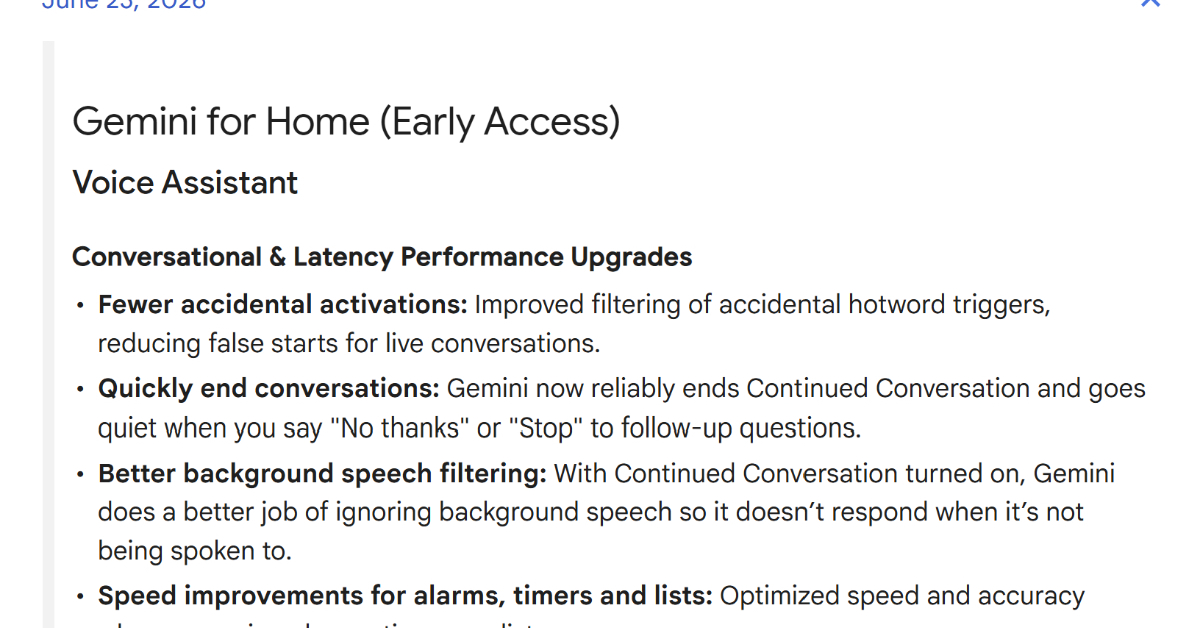
On June 23 (local time), Google released new リリースノート (rirīsu nōto) detailing major improvements to its smart home ecosystem, including faster response times for “Gemini for Home” and an updated Google Home app (version 4.20). The changes focus on speed, accuracy, and reducing those awkward moments when your device starts talking even though you weren’t speaking to it.
Let’s break down what’s new — and learn some authentic Japanese along the way.
Gemini for Home Gets Faster and Smarter
Google has been gradually introducing “Gemini for Home” as the successor to Google Assistant. In this latest アップデート (appudēto), the company improved both conversation performance and response speed.
One major fix: reducing false activations caused by mishearing the hotword. In Japanese, this kind of unwanted reaction is often described as 誤起動(gokidō), meaning “false activation.” Google adjusted the system to suppress incorrect detections and reduce accidental responses during live conversations.
They also made sure that saying “No thanks” or “Stop” will reliably end a conversation. In Japanese, this kind of “making sure something happens” is often expressed with:
✅ Grammar in Action: 〜ようにする
This pattern means “to make sure that…” or “to try to…”
For example:
確実に終了するようにした。 Kakujitsu ni shūryō suru yō ni shita. They made it so that it ends reliably.
誤起動を減らすように改善した。 Gokidō o herasu yō ni kaizen shita. They improved it to reduce false activations.
Google also improved フィルタリング (firutaringu, filtering) of surrounding voices when “continued conversation” mode is turned on, making the device less likely to respond when you’re not addressing it.
Alarm, timer, and list controls were also optimized — in Japanese, 最適化 (saitekika) — for both speed and accuracy.
Faster Music Playback and Better Voice Recognition
Media playback has also been enhanced. Starting Spotify and YouTube is now faster, even with simple requests like:
- 音楽を再生して。 Ongaku o saisei shite. Play some music.
Playback of favorite playlists and shuffle mode now feature more reliable voice recognition and improved spoken confirmations.
You can also ask questions like:
- この曲を歌っているのは誰? Kono kyoku o utatte iru no wa dare? Who is singing this song?
Google says answers about artists, movies, and music are now more accurate.
Designed for the Whole Family — Including Kids
Another significant change: Gemini for Home is now available to all family members, including children, across supported countries and languages.
Kids can ask how to spell words or enjoy new jokes. This reflects a broader trend in Japan and elsewhere of integrating AI assistants into children’s learning and playtime — blending technology with education at home.
Smarter Camera AI and Premium Features
Camera-related AI features have also been upgraded.
Detection accuracy for 認識済みの人物 (ninshiki-zumi no jinbutsu, recognized individuals) has improved. The system now automatically updates its library with the most recent and accurate examples.
For users of Google Home プレミアム (puremiamu, premium) “Advanced” plan, the system can even recognize people when their faces aren’t visible by using additional signals such as clothing. This helps reduce missed detections and misidentifications.
Another addition: sound detection in AI-generated event descriptions. If an event includes audio — such as barking dogs, alarms, or footsteps — the system identifies the sound and reflects it in the event description on the タイムライン (taimurain, timeline).
That means you can ask:
- “Did the dog bark during the delivery?”
However, audio detection also requires the Premium Advanced plan.
Google Home App Version 4.20 Rolls Out
The Google Home app version 4.20 began its ロールアウト (rōruauto, gradual release) on the same day.
For Android:
- Camera event loading was optimized.
- The loading screen display time was shortened.
- Playback now starts faster.
For iOS:
- The timeline was improved.
- Events continue loading smoothly while scrolling.
Support for Matter-compatible switches was also enhanced. Multiple-button switches can now be combined into a single tile. The update includes various bug fixes and overall stability and performance improvements.
Gemini’s Gradual Expansion in Japan
Since October 2025, Google has been gradually expanding Gemini for Home through an early access program for multiple speakers and smart displays. Early access began in Japan this April.
A new smart speaker optimized specifically for Gemini — Google Home スピーカー — will go on sale in Japan on June 25 for 16,800 yen (tax included).
Cultural Context: Why Release Notes Matter in Japan
Japanese tech users closely follow official リリースノート (rirīsu nōto). Transparency about improvements, bug fixes, and performance changes builds trust — especially for home devices that listen and monitor environments.
The emphasis on reducing 誤起動 (false activation) reflects privacy sensitivity in Japanese homes, where minimizing unnecessary device reactions is highly valued.
Learn Japanese from This Article
Key Vocabulary
| Japanese | Romaji | Meaning |
|---|---|---|
| アップデート | appudēto | update |
| リリースノート | rirīsu nōto | release notes |
| ロールアウト | rōruauto | rollout (gradual release) |
| フィルタリング | firutaringu | filtering |
| プレミアム | puremiamu | premium (paid tier) |
| タイムライン | taimurain | timeline |
| 最適化 | saitekika | optimization |
| 誤起動 | gokidō | false activation |
Notice how many tech words in Japanese are loanwords written in katakana. Learning these gives you instant access to modern Japanese discussions about technology.
Grammar Spotlight
1️⃣ 〜ようにする
Meaning: Make sure to / Try to
Structure: Verb (dictionary form) + ようにする
Examples:
誤起動を減らすようにする。 Gokidō o herasu yō ni suru. Make sure to reduce false activations.
確実に終了するようにした。 Kakujitsu ni shūryō suru yō ni shita. They made sure it ends reliably.
This pattern is extremely common in announcements about improvements or policy changes.
2️⃣ 〜ほか
Meaning: Besides / In addition to
Structure: Noun + のほか
Example:
- 応答速度の改善のほか、誤起動も減らした。 Ōtō sokudo no kaizen no hoka, gokidō mo herashita. Besides improving response speed, they also reduced false activations.
You’ll often see this in formal writing and news articles.
Useful Expressions
音楽を再生して。 Ongaku o saisei shite. Play some music.
この曲を歌っているのは誰? Kono kyoku o utatte iru no wa dare? Who is singing this song?
続けて会話 Tsudzukete kaiwa Continued conversation
These are practical phrases you could actually use with a smart speaker in Japan.
Continue Learning
To understand more about expressing time clearly in Japanese news, explore our lesson on time expressions:
Technology evolves quickly — and so does language. By reading real Japanese tech news, you’re not just learning vocabulary; you’re seeing how modern Japan talks about AI, privacy, and everyday digital life.
Keep going. Your Japanese is becoming more real with every article.
これからもよろしくお願いします。 Kore kara mo yoroshiku onegaishimasu.