
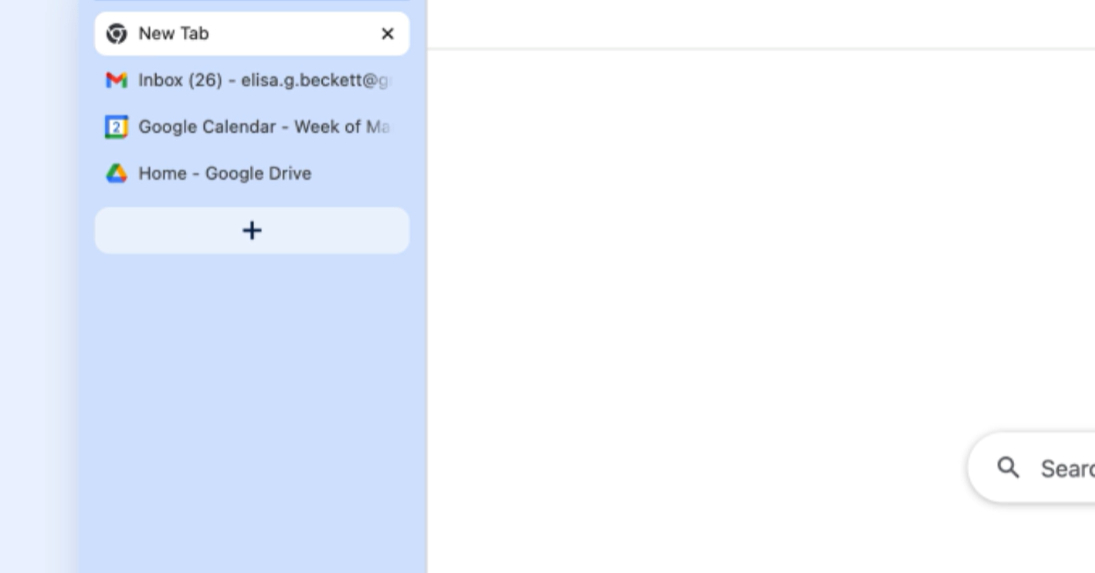
On April 7 (local time), Google announced two long-awaited new features for its web browser Chrome: vertical tabs and a full-screen reading mode. Both features begin rolling out to all users the same day.
For anyone who constantly juggles dozens of tabs, this update could completely change how you experience the browser—and it gives us some great real-world Japanese tech vocabulary to learn along the way.
Chrome Gets Vertical Tabs
The first new feature is the 垂直タブ (suichoku tabu) function—vertical tabs.
You can activate it by right-clicking on the タブバー (tabu baa, tab bar) at the top of the Chrome ウィンドウ (uindou, window) and selecting:
- タブを縦方向に表示 (tabu o tate houkou ni hyouji) “Show tabs vertically”
Once enabled, your tabs line up vertically along the left side of the screen.
Why Vertical Tabs Matter
Google explains that by arranging tabs vertically, you can read the full page titles—even when the number of open tabs reaches double digits. It also makes managing tab groups easier and helps prevent you from losing track of the page you need.
In Japanese, the explanation uses a very common grammar pattern:
タブを画面の左端に縦並びに配置することで… Tabu o gamen no hidari hashi ni tatenarabi ni haichi suru koto de… “By arranging tabs vertically along the left edge of the screen…”
The structure 〜することで (~suru koto de) means “by doing…” or “through doing…”. It shows the method used to achieve a result. We’ll break this down more in the learning section below.
If you want to switch back, simply right-click the tab bar again and choose:
- タブを横方向に表示 (tabu o yoko houkou ni hyouji) “Show tabs horizontally”
It’s worth noting that this vertical tab feature already exists in Microsoft Edge and Mozilla Firefox. Now Chrome users can access it as well.
Reading Mode Goes Full Screen
The second update improves Chrome’s リーディングモード (riidingu moodo, reading mode).
Reading mode removes visual distractions from complex web pages and converts them into a text-centered experience with a stronger sense of immersion. The article describes this immersive feeling as:
- 没入感 (botsunyuu-kan) — a sense of immersion
Chrome has offered reading mode in the デスクトップ版 (desukutoppu-ban, desktop version) since around 2023. Until now, it appeared as a サイドパネル (saido paneru, side panel) on the right side of the screen.
With this update, it can now be displayed in:
- 全画面表示 (zengamen hyouji) — full-screen display
This change is described using another essential Japanese grammar pattern:
全画面表示できるようになった。 Zengamen hyouji dekiru you ni natta. “It has become possible to display it in full screen.”
The structure 〜ようになる (~you ni naru) means “to come to be able to…” or “to reach a state where something becomes possible.” It often describes new abilities, changes, or developments—perfect for tech news like this.
Tech Language in Modern Japanese
One fascinating aspect of this article is how much of the vocabulary comes from English but is written in katakana.
Words like:
- ロールアウト (rooru auto) — rollout
- ウィンドウ (uindou) — window
- タブバー (tabu baa) — tab bar
- サイドパネル (saido paneru) — side panel
These are loanwords adapted to fit Japanese pronunciation. In Japan, tech terminology is often absorbed directly into everyday language, especially in IT media. Learning these words helps you read real Japanese news without feeling overwhelmed.
Rather than translating everything into “pure” Japanese, modern media reflects how people actually speak and work—especially in technology fields.
Learn Japanese from This Article
Key Vocabulary
| Japanese | Romaji | Meaning |
|---|---|---|
| ロールアウト | rooru auto | rollout; gradual feature release |
| ウィンドウ | uindou | software window |
| タブバー | tabu baa | tab bar |
| サイドパネル | saido paneru | side panel |
| 全画面表示 | zengamen hyouji | full-screen display |
| 没入感 | botsunyuu-kan | sense of immersion |
| デスクトップ版 | desukutoppu-ban | desktop version |
| 垂直 | suichoku | vertical |
Grammar Spotlight 1: 〜することで (By Doing…)
Pattern: Verb (dictionary form) + ことで
Meaning: “By doing…” / “Through doing…”
Example from the article:
- タブを縦に配置することで、管理が容易になる。 Tabu o tate ni haichi suru koto de, kanri ga youi ni naru. By arranging tabs vertically, management becomes easier.
Another example:
- 毎日日本語を読むことで、語彙が増えます。 Mainichi nihongo o yomu koto de, goi ga fuemasu. By reading Japanese every day, your vocabulary increases.
This pattern is extremely common in explanations and instructions.
Grammar Spotlight 2: 〜ようになる (Come to Be Able To)
Pattern: Verb (dictionary form) + ようになる
Meaning: To come to be able to; to reach a new state
Example from the article:
- 全画面表示できるようになった。 Zengamen hyouji dekiru you ni natta. It has become possible to display it full-screen.
Another example:
- 日本語のニュースが読めるようになりました。 Nihongo no nyuusu ga yomeru you ni narimashita. I’ve become able to read Japanese news.
You’ll see this pattern constantly in stories about growth, development, and technological improvements.
Useful Expression
- タブを見失う (tabu o miushinau) — to lose track of a tab
Example:
- タブが多すぎて、目的のページを見失いました。 Tabu ga oosugite, mokuteki no peeji o miushinaimashita. I had too many tabs and lost track of the page I needed.
Continue Learning
Working on your reading skills? Our Katakana Essentials: Adapting Global Words to Japanese lesson is a great next step.
To understand more about tech, explore our Basic Vocabulary Building: Embracing Words Without Latin Ties lesson.
Ready to dive deeper? Our lesson on Reading and Writing in Japanese II: Hiragana and Katakana will help you master these concepts.
Tech news like this isn’t just about new features—it’s a window into how modern Japanese is actually written and used. By reading authentic articles, you’re training your eye to recognize real vocabulary, real grammar, and real cultural context.
これからもよろしくお願いします。 Kore kara mo yoroshiku onegaishimasu.